
THE ORGANIZER’S CLUBHOUSE
Nonprofit pricingClubhouse FAQ
The clubhouse/THE COMPLETE KIT
01 / THE COMPLETE KIT

Everything in your bag.
Ready for your next round.

Six working files for your numbers, your people and the details that make the day work. Personalize them for the event you’re organizing.

Explore the files
Illustrative golf-course landscape with a putting green and sand bunker
01
GOOD GOLF DAYS START HERE.
SIX FILES / ONE COMPLETE KIT

The right tools.
For the whole round.

Both packages include every file below. After confirmed payment, download each document separately from your private page, or choose the complete ZIP.

01
Start hereYour company details, setup steps and usage license.
TXT

File overview, the recommended setup order and the permitted-use license.

02
Clean organizer workbook11 editable tabs with your event setup and company details.
XLSX

Dashboard, Setup, Budget, Sponsors, Outreach, Players, Prizes, Volunteers, Run Sheet, Checklist and Help. Includes editable assumptions, formulas, dropdowns and review-date alerts.

03
Fictional worked exampleYour details alongside the clearly fictional example figures.
XLSX

The same workbook populated with fictional costs, sponsors and attendees. Follow the example while setting up a clean copy for your event.

04
Quick-start guide10-page reference guide plus an editable company details cover.
PDF

10 reference pages plus your editable company details cover, covering setup, forecast versus cash, break-even, sponsor commitments, rosters, event operations and file compatibility.

05
Event Template StudioSix layouts with prefilled details, dropdowns and editable wording.
HTML

Six layouts with prefilled company details and editable wording in one offline editor: a sponsor proposal, volunteer briefing, registration sign, welcome sign, prize-desk sign and sponsor thank-you sign. Edit the fields, save a filled copy or print to PDF.

06
Outreach Email Studio12 complete emails with prefilled details and editable wording.
HTML

An offline email studio with prefilled company details, editable wording and 12 emails covering sponsor and prize requests, follow-ups, commitment confirmations, collection, artwork, volunteer and player information, thanks and fulfillment.

11 TABS / ONE WORKING SCORECARD

A clearer picture.
From every angle.

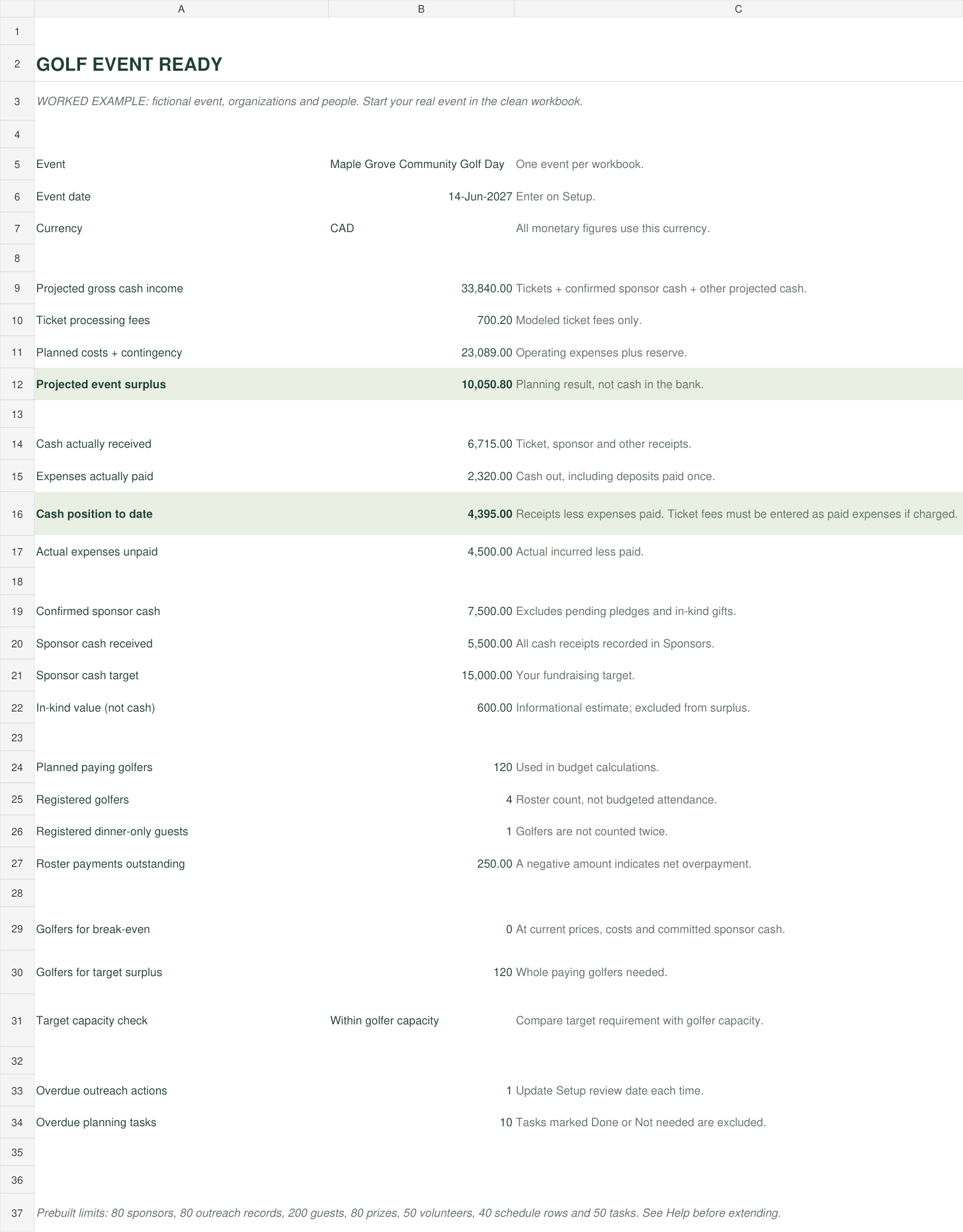
Start with Setup. Use the fictional worked example as a reference, then update your clean workbook as commitments and receipts come in.

Actual dashboard with fictional forecast and cash figures

ACTUAL WORKBOOK / FICTIONAL FIGURES

Forecast is not cash in the bank.

Keep expected income, confirmed commitments and actual receipts distinct. Donated goods can support an event without becoming cash available to pay a supplier.

See the workbook up close
01

Dashboard

Your forecast, cash position and golfer targets, together.

02

Setup

Event details and the assumptions behind your numbers.

03

Budget

Fixed and per-person costs, forecasts and actual cash.

04

Sponsors

Commitments, receipts, donated goods and promised benefits.

05

Outreach

Prospects, next actions and follow-up dates.

06

Players

Guest details, teams, payment position and check-in.

07

Prizes

Your item inventory, collection and delivery details.

08

Volunteers

Roles, shifts and the people responsible.

09

Run Sheet

Timings, locations and owners for the day itself.

10

Checklist

Preparation tasks and what still needs attention.

11

Help

Workbook notes to use alongside the quick-start guide.

THE EDITABLE STUDIOS

Good plans deserve
clear communication.

Fill your company details using the offline tool included in the download. Choose the layout or email you need, adjust the wording and prepare a version that fits your event.

06 LAYOUTS / EVENT TEMPLATE STUDIO

From the first proposal
to the welcome sign.

Build your event materials in an offline browser editor. Edit the fields, save a filled copy or print to PDF using your browser.

  • Sponsor proposal
  • Volunteer briefing
  • Registration and welcome signs
  • Prize-desk and sponsor thank-you signs
12 EMAILS / OUTREACH EMAIL STUDIO

A useful starting point.
For every conversation.

Adapt complete subjects and messages, then copy your final text into your email service. You choose the recipients and send the email.

  • Sponsor and prize requests; follow-ups
  • Commitments, collection and artwork
  • Volunteer and player information
  • Thanks and sponsor fulfillment
OPEN. EDIT. SAVE. REUSE.

Your files.
Your working copies.

What you’ll need

A desktop spreadsheet app that opens XLSX, a PDF form reader and a modern browser for the two HTML studios. Save your downloads on your computer and keep a separate copy for each event.

What stays editable

The workbooks, studio text and company-details cover can be adjusted. Use the included offline tool to generate fresh copies with updated company details.

Workbook formulas were checked in the authoring engine. Native Excel and Google Sheets import have not been independently tested. Fresh downloads do not include edits made in earlier file copies.

YOUR NEXT ROUND

Your next event. Fully in the bag.

Choose your tools. Make them yours. Get your event ready.

Choose your package